Putting EJBCA behind a reverse proxy with a trusted TLS certificate
So normally you'd deploy EJBCA internally. But what if you wanted to publicly use it for SCEP but not want to deploy the ManagementCA to user trust store?
That's when you'd put EJBCA behind a reverse proxy, but how?
Prerequisites
Prepare your own root CA: You'll need the keypair as a PKCS#12 file and the root CA certificate itself as a PEM file.
Put the root CA certificate to somewhere the reverse proxy can access. /opt/root_ca.pem would be an example. Make sure it is readable by everyone: chmod 644 /opt/root_ca.pem
DNS
Make sure you've set up a (sub-)domain that points to your EJBCA server. For this blog post, I've chosen ejbca.example.com.
Procedure
We'll go over bootstrapping EJBCA itself and the reverse proxy configuration.
EJBCA
Bring up EJBCA using Keyfactor's own Docker Compose file with little modifications:
---
networks:
  access-bridge:
    driver: bridge
  application-bridge:
    driver: bridge
services:
  ejbca-database:
    container_name: ejbca-database
    image: "library/mariadb:latest"
    restart: unless-stopped
    networks:
      - application-bridge
    environment:
      - MYSQL_ROOT_PASSWORD=foo123
      - MYSQL_DATABASE=ejbca
      - MYSQL_USER=ejbca
      - MYSQL_PASSWORD=ejbca
    volumes:
      - ./datadbdir:/var/lib/mysql:rw
  ejbca:
    hostname: ejbca-node1
    container_name: ejbca
    image: keyfactor/ejbca-ce:latest
    depends_on:
      - ejbca-database
    restart: unless-stopped
    networks:
      - access-bridge
      - application-bridge
    environment:
      - DATABASE_JDBC_URL=jdbc:mariadb://ejbca-database:3306/ejbca?characterEncoding=UTF-8
      - LOG_LEVEL_APP=INFO
      - LOG_LEVEL_SERVER=INFO
      - TLS_SETUP_ENABLED=later
      - PROXY_HTTP_BIND=0.0.0.0
    ports:
      # Proxy port for the HTTP endpoint (normally 8080 when PROXY_HTTP_BIND is not set)
      - "127.0.0.1:8081:8081"
      # Proxy port for the HTTPS endpoint, it is HTTP but has
      # SSL_CLIENT_CERT header support to provide the
      # equivalent of the regular HTTPS endpoint
      # (normally 8443 when PROXY_HTTP_BIND is not set)
      - "127.0.0.1:8082:8082"
Aside from the addition of restart: unless-stopped, notice that the environment variables TLS_SETUP_ENABLED is set to later and PROXY_HTTP_BIND is set to 0.0.0.0. These two makes few changes:
- Disable generation of ManagementCA, you need to provide/generate your own CA.
- Make Wildfly (the application server) not listen on HTTPS but on two special HTTP proxy ports:
8081for regular HTTP traffic, but with proxy header support8082for regular HTTPS traffic, but is HTTP with proxy port andSSL_CLIENT_CERTheader support as a way for the reverse proxy to provide the client certificate from an mTLS handshake.
Reverse Proxy
I chose NGINX for this, but you can choose any reverse proxy you want that supports mTLS with a different CA other than the one used for the web service.
Make sure you don't have any firewall rules blocking the ports 80 and 443.
Since I am doing all this in Enterprise Linux, the config file structure is a bit different than the Debian packaging; so be wary.
After install, make a copy of /etc/nginx/nginx.conf to a temporary place, you're going to use it later on: cp -a /etc/nginx/nginx.conf /tmp/nginx_prebootstrap.conf
Bootstrapping TLS with certbot
Set the server_name variable in the /etc/nginx/nginx.conf file to the (sub-)domain you've chosen.
Make sure to have the EPEL repository installed and enabled. Install certbot and its NGINX plugin (dnf install certbot python3-certbot-nginx).
Register your ACME account: certbot register --email your_email@example.com --no-eff-email --agree-tos
Obtain your TLS certificate and install it into NGINX automatically: certbot --nginx --domains ejbca.example.com --key-type rsa
Re-configuring NGINX
Copy back the config file from earlier: cp -af /tmp/nginx_prebootstrap.conf /etc/nginx/nginx.conf
Comment out the default server block that's below the line include /etc/nginx/conf.d/*.conf; in /etc/nginx/nginx.conf. It should look like this:
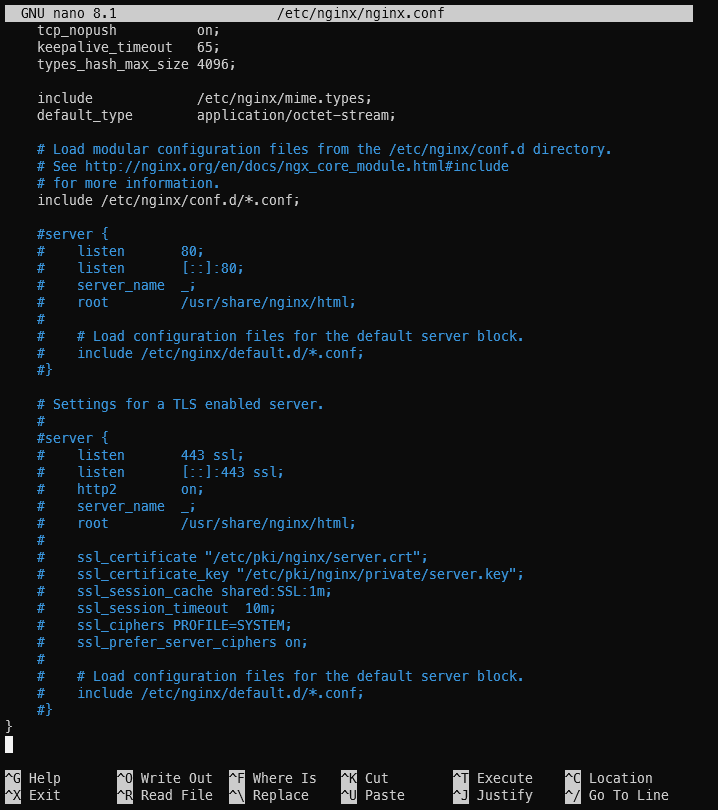
We're going to create two files: /etc/nginx/default.d/proxy.conf and /etc/nginx/conf.d/ejbca.conf.
/etc/nginx/default.d/proxy.conf:
proxy_set_header Host              $host;
proxy_set_header X-Real-IP         $remote_addr;
proxy_set_header X-Forwarded-For   $proxy_add_x_forwarded_for;
proxy_set_header X-Forwarded-Proto $scheme;
proxy_set_header X-Forwarded-Host  $host;
proxy_set_header Connection        "";
The following virtual server configuration is somewhat translated from what Keyfactor documentation provides with Apache2, with a slight tweak of using regular HTTP instead of using AJP.
/etc/nginx/conf.d/ejbca.conf:
server {
    listen       80;
    listen       [::]:80;
    server_name  ejbca.example.com;
    root         /usr/share/nginx/html;

    access_log /var/log/nginx/ejbca_http_access.log combined;
    error_log  /var/log/nginx/ejbca_http_error.log  warn;

    include /etc/nginx/default.d/proxy.conf;

    # CRL Distribution Point
    location = /publicweb/webdist/certdist {
        if ($arg_cmd = "crl") {
            rewrite ^(.*)$ /ejbca$1 break;
            proxy_pass http://127.0.0.1:8081;
            break;
        }
        return 301 https://$host$request_uri;
    }

    # Healthcheck and OCSP
    location /publicweb/status/ {
        rewrite ^(.*)$ /ejbca$1 break;
        proxy_pass http://127.0.0.1:8081;
    }

    location /ejbca/ {
        # Only the CRL/OCSP/healthcheck endpoints are allowed in the clear;
        # any other request redirect to HTTPS.
        if ($request_uri !~ ^/ejbca/(publicweb/webdist/certdist\?.*cmd=crl|publicweb/status/)) {
            return 301 https://$host$request_uri;
        }
        proxy_pass http://127.0.0.1:8081;
    }

    location / {
        return 301 https://$host$request_uri;
    }
}

server {
    listen 443 ssl; # managed by Certbot
    listen [::]:443 ssl ipv6only=on; # managed by Certbot
    http2 on;
    server_name  ejbca.example.com;

    root         /usr/share/nginx/html;

    access_log /var/log/nginx/ejbca_https_access.log combined;
    error_log  /var/log/nginx/ejbca_https_error.log  warn;

    ssl_certificate /etc/letsencrypt/live/ejbca.example.com/fullchain.pem; # managed by Certbot
    ssl_certificate_key /etc/letsencrypt/live/ejbca.example.com/privkey.pem; # managed by Certbot
    include /etc/letsencrypt/options-ssl-nginx.conf; # managed by Certbot
    ssl_dhparam /etc/letsencrypt/ssl-dhparams.pem; # managed by Certbot

    ssl_client_certificate    /opt/root_ca.pem;
    ssl_verify_client         optional;
    ssl_verify_depth          1;

    location /ejbca/adminweb {
        #if ($ssl_client_verify != SUCCESS) { return 403; } # uncomment after creating and installing your SuperAdmin certificate then remove the SuperAdmin public access policy.
        proxy_pass http://127.0.0.1:8082;
        include /etc/nginx/default.d/proxy.conf;
        proxy_set_header SSL_CLIENT_CERT $ssl_client_cert;
    }
    location /adminweb {
        #if ($ssl_client_verify != SUCCESS) { return 403; } # uncomment after creating and installing your SuperAdmin certificate then remove the SuperAdmin public access policy.
        rewrite ^(.*)$ /ejbca$1 break;
        proxy_pass http://127.0.0.1:8082;
        include /etc/nginx/default.d/proxy.conf;
        proxy_set_header SSL_CLIENT_CERT $ssl_client_cert;
    }


    location /ejbca/ {
        proxy_pass http://127.0.0.1:8082;
        include /etc/nginx/default.d/proxy.conf;
        proxy_set_header SSL_CLIENT_CERT $ssl_client_cert;
    }
    location / {
        rewrite ^(.*)$ /ejbca$1 break;
        proxy_pass http://127.0.0.1:8082;
        include /etc/nginx/default.d/proxy.conf;
        proxy_set_header SSL_CLIENT_CERT $ssl_client_cert;
    }
}
Make sure to have these files readable by NGINX: chmod 644 /etc/nginx/default.d/proxy.conf /etc/nginx/conf.d/ejbca.conf
To make sure everything went okay, reboot the entire server.
Copyright 2018-2026, linuxgemini (İlteriş Yağıztegin Eroğlu). Any and all opinions listed here are my own and not representative of my employers; future, past and present.